Independent macOS experiment

ChatGPT
Auto Router

Automatic gears for ChatGPT and Codex.

Ask normally. A lightweight classifier reads the job, chooses a real model from your signed-in account, and shifts reasoning effort only when the work needs it.

  • Uses your live model catalog
  • Manual choices still work
  • Original app stays untouched

See it working

One composer. No model-picking homework.

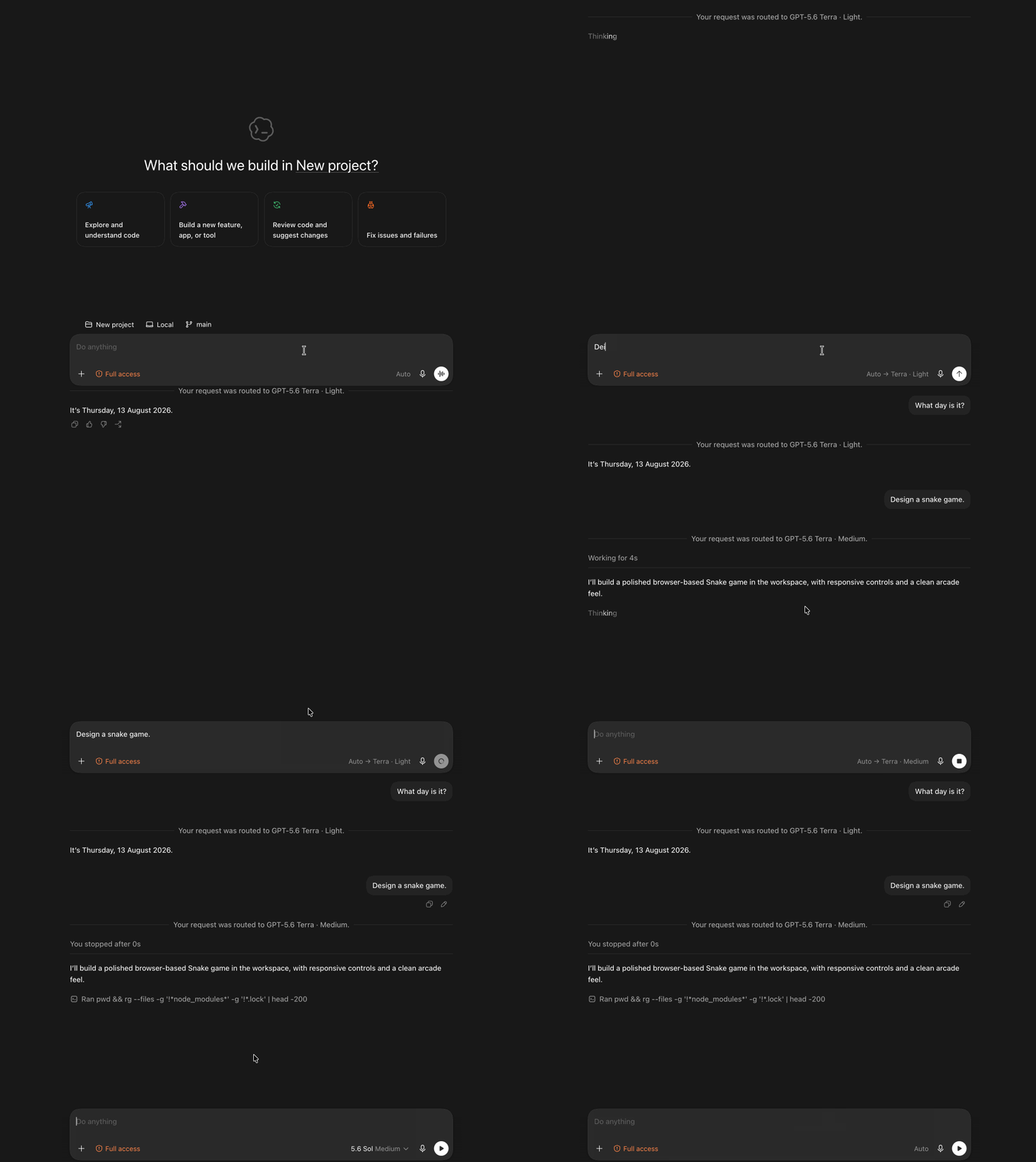
The picker stays on Auto while each request receives a concrete model and effort before dispatch.

ChatGPT Auto Router demo showing a Codex prompt routed automatically while Auto remains selected in the model picker
The demo shows the patched client experience. Auto resolves to an advertised concrete model before the task is sent.

The idea

Automatic gears, not another model picker.

ChatGPT has models that trade speed for deeper reasoning. Normally, you decide which one to use before you know how difficult the task will become.

Auto Router makes that choice per message. Simple work stays responsive; everyday coding, writing, and research use the balanced lane; difficult debugging and reasoning shift into the more powerful lane.

From your side, nothing changes: type, send, and keep working.

01

Ask normally

No special syntax and no pre-flight model decision.

02

Classify quietly

A fast hidden pass rates what the assistant must do next.

03

Shift and show

The real worker and effort are selected, dispatched, and attributed.

Routing policy

Five levels. Two workers. One hidden classifier.

The live signed-in catalog remains authoritative. The router never invents a model slug or uses its classifier as the worker.

Classifier

Luna

Fast semantic rating when advertised and callable.

Never handles the user's actual task
Levels 1–3

Terra

Simple, moderate, and complex work at low or medium effort.

The responsive everyday worker
Levels 4–5

Sol

Hard and extreme work at medium or high effort.

Reserved for the difficult turns

Model availability varies by account and client. See OpenAI's current model guidance (opens in a new tab).

Build the disposable client

Give Codex the complete brief.

On the Mac with ChatGPT installed, start a fresh Codex task using Sol at xhigh reasoning—or Ultra mode when available—then paste this prompt in full.

  1. 1Open a fresh Codex task
  2. 2Select Sol · xhigh or Ultra
  3. 3Paste and let it run end to end
From-scratch execution prompt 566 lines · plain text · safety-bounded
Download

Know the boundaries

A careful experiment, not an official feature.

Disposable by design

The brief preserves the installed original and builds a separately named, ad-hoc signed copy with an isolated profile.

Updates fail closed

Client patches are version-specific. A future ChatGPT build must be inspected and explicitly supported, never patched by guessing.

Requested, not guaranteed

The client can prove what it requested and stored. It cannot prove whether the service made an opaque substitution after dispatch.

ChatGPT Auto Router is an independent experiment and is not an official OpenAI feature or supported client.